A comprehensive syllabus for becoming a self-taught Daoist practitioner or solitary monastic adept (Daoren / Chujia) synthesizes the foundational four-phase curriculum from the traditional canon and Quanzhen monastic manuals, while offering an accessible 12-month progressive schedule.


Foundational Principles of Solitary Monastic Study

In historical traditions such as Quanzhen (Complete Perfection), monastic and eremitic cultivation (huandu) emphasizes the dual cultivation of innate nature (Xing) and life-destiny (Ming). While formal institutional ordination (Daoshi) traditionally requires temple transmission, a solitary practitioner establishes self-discipline through ethical precepts, daily quiet sitting (Jingzuo / Zuowang), internal energetics (Neidan), and sacred scripture study (Jingxue).


Core Curriculum Structure (The 4 Progressive Phases)

Phase 1: Philosophical Foundations (Daojia)

  • Worldview & Cosmology: The formless and eternal Dao, Yin-Yang polarities, the Five Phases (Wuxing), and the Three Treasures (Jing, Qi, Shen).
  • Core Classics:
    • Dao De Jing (Laozi): Contemplating Wu Wei (effortless action), Ziran (spontaneity), and the simplicity of the uncarved block (P’u).
    • Zhuangzi (Master Zhuang): Focusing on the “Inner Chapters” to cultivate perspective, freedom from rigid mental categories, and carefree wandering (Xiaoyao).
    • Liezi (Master Lie): Studying spontaneity, harmony with natural transformations, and practical application in everyday life.
  • Daily Rule: Read one section of classical text daily; practice observing events without forceful interference (Wu Wei).

Phase 2: Internal Cultivation & Energetics (Neidan)

  • Movement & Somatic Alignment: Foundational Qigong routines such as the Eight Pieces of Brocade (Ba Duan Jin) to regulate the channels and circulation, alongside Tai Chi Chuan (Taijiquan) as moving Yin-Yang meditation.
  • Stillness & Breath Regulation:
    • Zuowang (Sitting in Forgetfulness): Emptying the heart-mind and shedding intellectual attachments.
    • Xiao Zhou Tian (The Microcosmic Orbit): Circulating breath and vitality between the lower elixir field (Dantian), the spine (Governing Vessel / Du Mai), and the chest/abdomen (Conception Vessel / Ren Mai).
  • Core Practice Texts: Foundation of Internal Alchemy (Wang Mu) and Taoist Yoga: Alchemy and Immortality (Lu K’uan Yü / Pi Ch’en Chao).

Phase 3: Metaphysics & Natural Cycles (Shu Shu)

  • The Book of Changes (I Ching / Zhouyi): Mapping cosmic rhythms, hexagram dynamics, the Eight Trigrams (Bagua), and cultivating timing through the yarrow stalk or coin methods.
  • Cosmic Architecture:
    • Ba Zi (Four Pillars of Destiny): Understanding character, energetic constitution, and life cycles.
    • Feng Shui: Observing how the geomancy of wind and water affects bodily energy and environment.

Phase 4: Monastic Life, Liturgy & Precepts (Daojiao)

  • Altar Protocols & Pantheon: Setting up a sacred practice space, honoring the Three Pure Ones (Sanqing), ancestral teachers, and making daily offerings of incense, pure water, tea, and fruit.
  • Ethical Precepts & Monastic Regulations: Following ethical foundations like the Ten Precepts of Initial Perfection (Chuzhen Jie) and Master Wang Chongyang’s Fifteen Discourses on living simply, dietary moderation, and avoiding dissipation.
  • Liturgy: Chanting the Xuanmen Risong Zaowan Gongke (Morning and Evening Liturgy).
  • Core Reference: The Taoist Body (Kristofer Schipper) and The Way of Complete Perfection (anthology of monastic rules).

12-Month Modular Syllabus

SemesterMonthFocus TopicCore Text / SubjectPrimary Practical Exercise
Semester 1: Philosophical Grounding1The Way and Its PowerDao De Jing (Laozi)Morning quiet sitting (15 min) + daily journaling on Wu Wei.
2Perspective & EmptinessZhuangzi (“Inner Chapters”)Walking meditation in nature; observing the shifting of mental judgments.
3Spontaneity in Daily LifeLieziAdopting simplicity in speech, food, and daily commitments.
Semester 2: Energetics & Stillness4Regulating Body & QiFoundations of Internal Alchemy (Wang Mu)Daily practice of the Eight Pieces of Brocade (Ba Duan Jin).
5The Microcosmic OrbitTaoist Yoga (Lu K’uan Yü)Diaphragmatic abdominal breathing and circulating Qi through the Du and Ren channels.
6Sitting in ForgetfulnessZuowang treatises & Qingjing JingExtended quiet sitting (Jingzuo); resting the mind in stillness without grasping thoughts.
Semester 3: Metaphysics & Cosmology7The Book of ChangesThe I Ching (Wilhelm/Baynes or critical texts)Learning the 8 Trigrams, 64 Hexagrams, and oracle contemplation.
8Astrology & ConstitutionBa Zi: The Four Pillars of DestinyCalculating and analyzing one’s energetic birth chart and the five elemental phases.
9Environmental HarmonyTraditional Chinese Medicine & Feng Shui basicsAligning personal living space and daily rest to seasonal energetic nodes.
Semester 4: Liturgy & Monastic Rhythm10The Sacred Space & PantheonClassical Daoist altar manualsEstablishing a domestic altar; practicing formal bowing and incense offerings.
11Sacred Script & SealsFu Lu and Talismanic History (The Taoist Body)Study of sacred calligraphy, talismanic geometry, and symbolic seals.
12The Monastic DayMorning & Evening Recitations (Gongke)Establishing a strict morning and evening recitation schedule alongside personal vows.

Solitary Monastic Daily Routine (Riyong)

In the Quanzhen tradition, true cultivation is not an isolated exercise but an all-encompassing daily application (Riyong):

  1. Dawn (5:00 AM – 7:00 AM): Arise, wash, offer fresh water and incense at the altar, recite the Morning Liturgy, and practice standing or moving Qigong/Taiji.
  2. Midday (11:00 AM – 1:00 PM): Simple vegetarian meal eaten in mindful silence; short period of walking or quiet breath circulation.
  3. Afternoon / Dusk (5:00 PM – 7:00 PM): Scriptural study (Jingxue), evening quiet sitting (Jingzuo), and the Evening Liturgy.
  4. Night (9:00 PM – 11:00 PM / Zi hour): Midnight meditation or Chen Tuan’s Sleeping Gong (Shui Gong) to rest without mental dissipation or energy loss.

Note on the Daoist-Christian Synthesis

Because your study environment explicitly explores the convergence between Daoist cultivation and Christian monasticism, the traditional curriculum adapts seamlessly:

  • Philosophical Bridge: Equate the unnamable, eternal Dao with the Divine Logos of the Gospel of John, and De (Virtue/Power) with Divine Grace.
  • Contemplative Kenosis: Pair Daoist Zuowang (emptying the mind) with the Christian practice of Kenosis (self-emptying), Centering Prayer, or the Jesus Prayer.
  • Liturgy: In place of folk invocations or divination, synchronize the Daoist morning/evening framework with the Liturgy of the Hours (Divine Office) and Lectio Divina.
Meet Pi: The Minimalist, Anti-Bloat AI Coding Agent You Didn’t Know You Needed

If you’ve spent any time working with modern AI coding assistants, you’ve likely noticed a frustrating trend: they are rapidly evolving into unwieldy, feature-bloated “spaceships.” They impose rigid workflows, dump 18,000-token system prompts into your context window before you even type a word, and often prioritize “vibe slop”—unsupervised agent swarms generating thousands of unreviewed lines of code—over maintainable software architecture.
Enter Pi (hosted at pi.dev), an open-source AI coding agent and terminal harness built in TypeScript and Node.js. Pi takes a radically different approach. It is not an opinionated consumer app; it’s a lightweight, transparent foundation designed to adapt to your workflow, not the other way around.
Here is a comprehensive guide to what makes Pi tick, its core philosophy, and a full tutorial on the commands and workflows you need to master it.

The Philosophy of Radical Minimalism

Pi is built on a few core tenets that push back against the current meta of heavy AI coding tools:

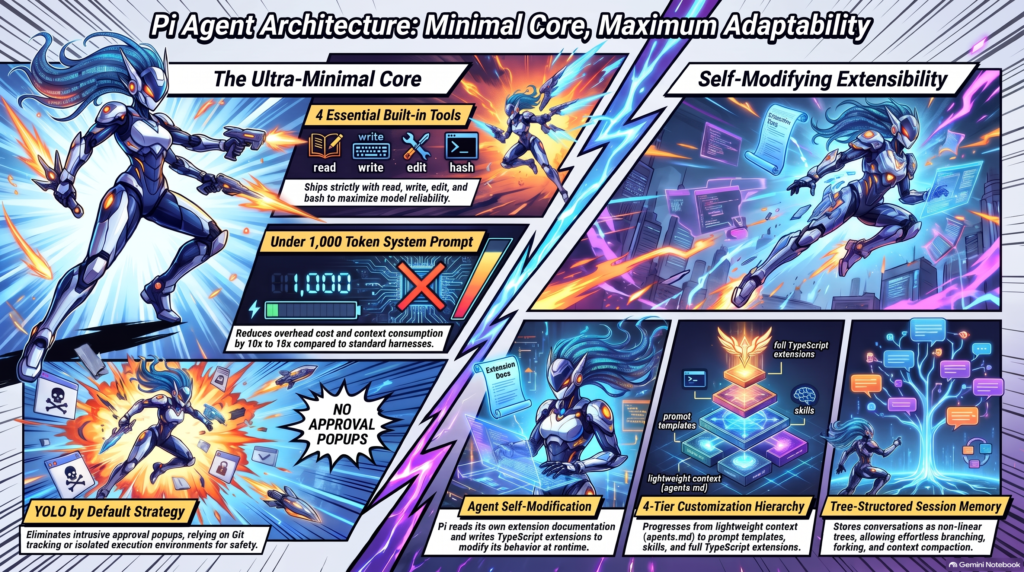
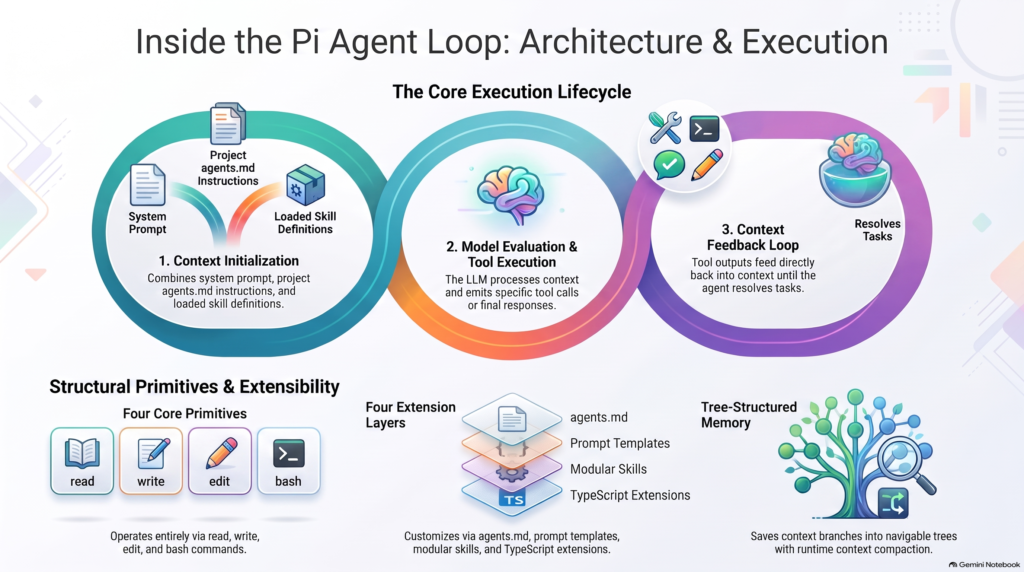
  • A Tiny Core: Out of the box, Pi provides exactly four tools: read, write, edit, and bash. Its base system prompt and tool definitions fit in under 1,000 tokens. There is no built-in Model Context Protocol (MCP) bloating your prompts, no hidden autonomous sub-agents, and no built-in “plan mode.”
  • “YOLO by Default” Over Security Theater: Pi executes commands without confirmation prompts by default. Why? Because repeated permission dialogs merely create click-fatigue, leading developers to blindly approve prompts anyway. If you want safety, Pi encourages genuine boundaries like Git, containers, or custom permission gates tailored to your specific infrastructure.
  • Anti-“Vibe Slop” and Human Agency: LLMs compound local errors globally if left unchecked. Pi treats the agent as a “bicycle for the mind.” The human remains the system architect; the agent explores solution spaces, handles boilerplate, and assists with refactoring within well-defined constraints.
  • Start with the Least Powerful Tool: Customization is encouraged, but layered. You start with simple markdown instructions (agents.md), move to Prompt Templates, then to modular Skills, and finally to executable TypeScript Extensions.

Architecture: The Tree-Based Agent Loop

Unlike monolithic setups, Pi’s monorepo cleanly splits into four packages: pi-ai (provider abstractions), pi-agent-core (the loop), pi-tui (a custom, non-flickering terminal UI), and pi-coding-agent.
The heart of Pi is its Agent Loop. When you submit a prompt, Pi assembles its <1,000 token system prompt, your agents.md rules, and your active branch history. If your context is getting bloated, Pi automatically runs a compaction check, compressing older conversation turns into structured summaries to free up tokens.
Tree-Based Session Branching: This is Pi’s most powerful architectural feature. Conversations are not stored as linear lists; they are saved as JSON-L trees. You can visualize your conversation, jump back to any previous prompt, create branches, or fork off entirely new sessions without losing your original context.

Tutorial: Installation & Initial Setup

Because Pi is so lightweight, getting started takes seconds.
Prerequisites: Node.js v22.19 or newer.
Installation:
Bash

# Install globally via npm
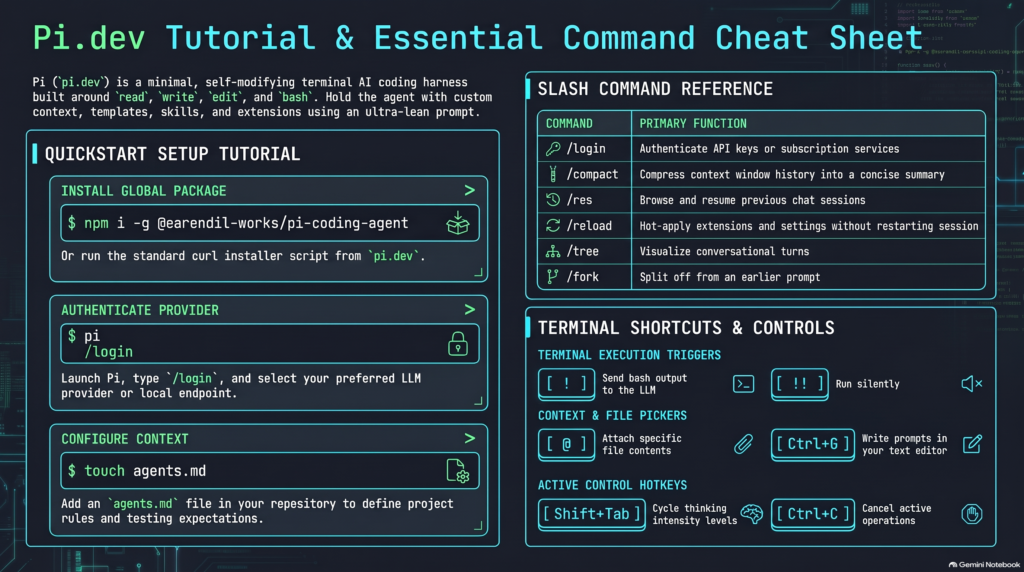
npm install -g @earendil-works/pi-coding-agent

First Run & Model Connection: Navigate to your project root (which sets Pi’s working boundary) and type:
Bash

pi

From the interactive prompt:

  1. Type /login to connect your API keys (OpenAI, Anthropic, Google, etc.) or local providers like Ollama.
  2. Type /model to select your active model.
  3. Press Ctrl + S in the picker to save it as your persistent default.

The Ultimate Pi Command & Shortcut Tutorial

To get the most out of Pi, you need to navigate its TUI efficiently. Here are the essential commands and shortcuts to drive the agent.

Session & History Navigation (Slash Commands)

Pi’s tree-based history gives you version control for your conversations.

  • /tree – Visualizes the conversation tree. Jump to any earlier message, edit it, and branch off (with or without an AI-generated summary of the abandoned path).
  • /fork – Splits off from a previous user message into a brand new conversation session file.
  • /clone – Duplicates the current session at its exact point in time so you can experiment safely on a copy.
  • /resume (or /res) – Opens an interactive picker of past sessions for the current folder.
  • /new – Clears the active context and starts a fresh conversation in the current directory.
  • /name <name> – Assigns a custom name to the active conversation to easily find it later.
  • /compact – Manually compresses older conversation turns into a structured summary (retaining goals, file paths, and key decisions) to free up token capacity.
  • /session – Displays real-time session statistics: total messages, token usage, cache hit rate, and monetary cost.

In-TUI Keyboard Shortcuts & Input Syntax

  • @filename – Type @ in the editor to bring up a fuzzy file search. This injects the file’s contents directly into your prompt.
  • ! – Executes a local bash command and pipes the output into the conversation context for the model to see.
  • !! – Executes a local bash command quietly without sending the terminal output to the model (ideal for committing with git).
  • Shift + Tab – Cycles reasoning/thinking effort between off, low, medium, high, and max (for models like DeepSeek-R1).
  • Ctrl + P – Cycles through your configured models on the fly.
  • Ctrl + L – Opens the model selection list.
  • Ctrl + G – Opens your current multi-line prompt in an external text editor (like VS Code) and pastes the result back into Pi upon saving.
  • Ctrl + O – Expands or collapses full tool outputs and execution details in the chat viewport.
  • Ctrl + T – Toggles the visibility of thinking and reasoning traces.
  • Alt + Enter – Queues up follow-up prompts to execute sequentially once Pi completes the current turn.
  • Escape – Press once to interrupt the current generation. Press twice to jump back to previous prompt messages in the session tree.

Useful CLI Flags

You can run Pi directly from your shell outside interactive mode:

  • pi -c (or --continue) – Resumes the most recent conversation session in the current directory.
  • pi -p "<prompt>" – Executes a one-off headless prompt, prints the answer to stdout, and exits immediately. Great for shell scripts.
  • pi install <package-name> – Installs community extensions from npm or GitHub.

Building Your First Project

Pi looks for an agents.md file at the start of every session to establish project rules. You don’t even have to write it yourself. Just ask Pi:
“Create an agents.md file for this project: Node.js CLI tool, ES modules, no external dependencies, and specify that npm test runs unit tests.”Once configured, give Pi a multi-step task with clear constraints:
“Build a CLI flashcard app called study-deck that reads notes and runs a spaced-repetition quiz. Put scheduling rules in scheduler.js and write unit tests for the intervals. Run tests once at the end.”Pi will autonomously read, write, run bash commands, and test the code. You can press Ctrl + O to watch the internal tool execution in real-time.

Extending the Agent

Because coding agents can read documentation and write code, Pi is designed to extend itself. You can instruct Pi to write a custom TypeScript extension, and it will hot-reload it immediately in the running session without restarting.
Popular community extensions (installable via pi install npm <package-name>) include:

  • Web Access (pi-web-access): Adds fast web search, fetching, GitHub repository cloning, and PDF extraction.
  • Safety Gates (pi-permission-system): For those who want guardrails on “YOLO mode,” this intercepts dangerous bash commands and pops up interactive TUI approval prompts.
  • Multi-Agent Orchestration (pi-subagents): Spawns modular sub-agents (scout, oracle, worker) for complex workflows.
  • Tool Adapters (pi-mcp-adapter): A lightweight proxy that exposes MCP servers to Pi as callable tools without permanently bloating your base context.

The Perfect Match for Local Models

Setting up Pi with lightweight, local open-weights models (like Qwen 2.5 Coder, Gemma 4, or Llama 3) is where the architecture truly shines. Because Pi’s base context is under 1,000 tokens, you avoid the immediate context exhaustion that plagues heavy consumer harnesses.
If you are running a modern local setup—whether you’re leveraging an M2 MacBook or pushing the limits of a 32GB Snapdragon X2 Elite machine for local inference—Pi’s minimal footprint leaves maximum system memory and VRAM available for your actual LLM and its KV cache.
For local inference, llama.cpp is highly recommended for granular hardware control, though Pi connects seamlessly to Ollama (http://localhost:11434/v1) or LM Studio via OpenAI-compatible endpoints configured in your ~/.pi/agent/models.json file.
When using smaller models, remember to scope your tasks aggressively. Define module boundaries upfront, run /compact regularly to prevent context bloat, and consider using the “Advisor Pattern”—where a fast local model handles boilerplate and file reading, while you occasionally swap to a frontier model (via Ctrl + P) to review complex architectural diffs.

A True Bicycle for the Developer’s Mind

Pi proves that AI coding agents do not need to be heavy, opaque, or overly opinionated to be effective. By offering a rock-solid, programmable core with a tiny context footprint, Pi allows developers to mold the AI to their exact habits. Whether you are orchestrating an ensemble of local models or just looking for a fast, terminal-native pair programmer that gets out of your way, Pi is a blueprint for the future of developer tools.

Enhancing Learning with AI: A New Approach to Accelerated Learning Techniques

In today’s fast-paced world, mastering new skills and concepts quickly is more important than ever. Enter AI — a powerful tool that can revolutionize how we learn. Inspired by insights from various YouTubers who teach similar accelerated learning techniques, I’ve developed a philosophy that integrates AI into the learning process to make it more efficient and effective.

Step 1: Gathering Information

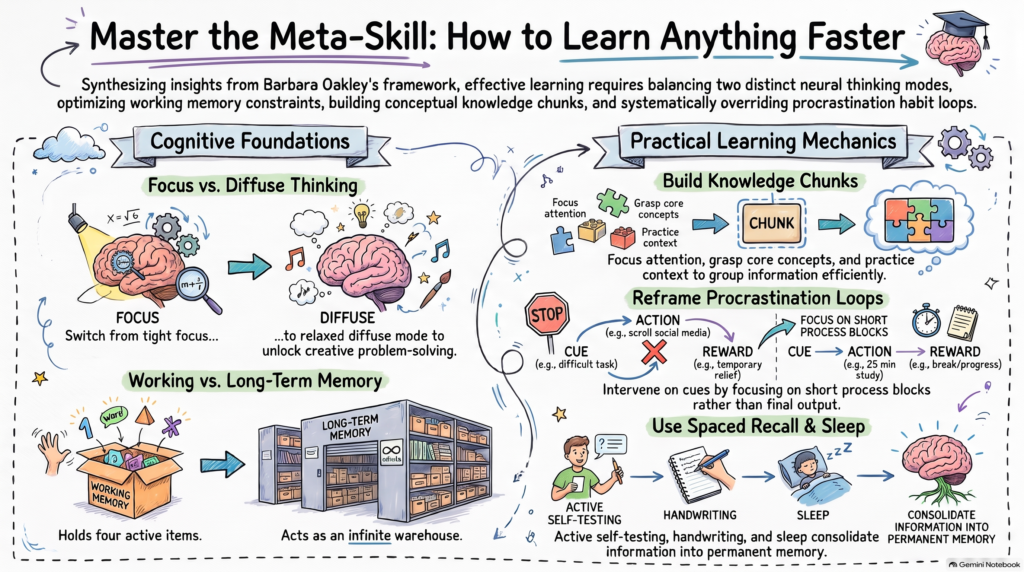
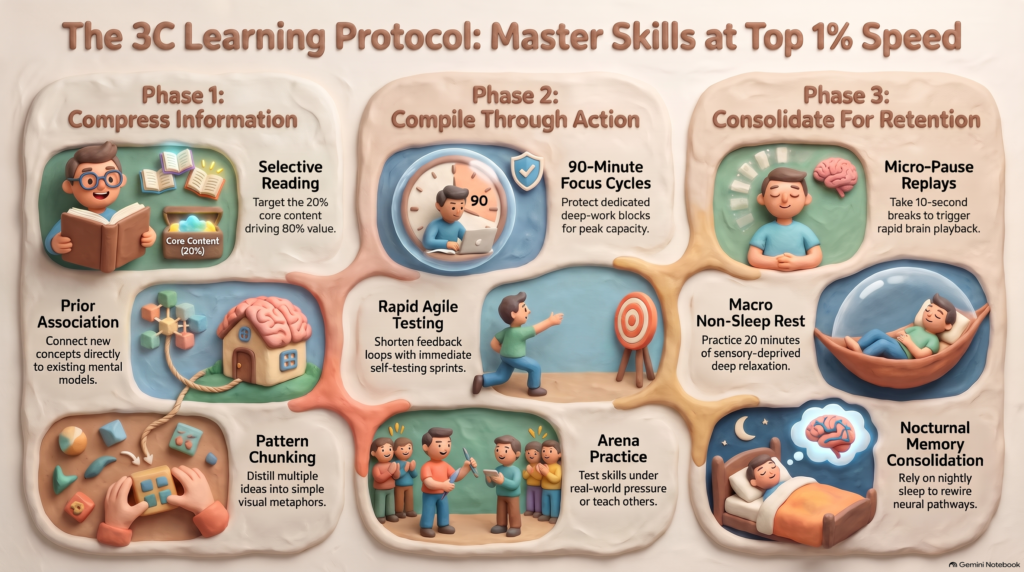
The journey begins with gathering information. Whether it’s through books, videos, or lectures, this stage is all about absorbing knowledge. Think of it as a passive step where you collect as much relevant information as possible to build a strong foundation.

Step 2: Synthesis and Chunking

Once you have your information, it’s time to break it down. This is where synthesis comes into play. By
deconstructing the material into smaller, manageable chunks, you make it easier to understand and retain. If you’ve tackled similar topics before, chunking becomes a breeze, allowing you to connect new knowledge with what you already know.

Step 3: Practice and Repetition

Practice makes perfect, and this step is all about repetition. Set aside dedicated time to focus solely on
practicing what you’ve learned. Techniques like the Pomodoro Technique can be incredibly helpful here. By blocking out time and concentrating on one task at a time, you enhance your focus and productivity. Remember, rest is just as crucial as work, so don’t forget to take breaks to recharge your brain.

Step 4: Self-Testing

After practicing, it’s time to test your knowledge. Quizzes and exams are traditional methods, but with AI, you can take this a step further. Using AI to create quizzes tailored to your learning pace and style can provide a more personalized assessment experience.

Introducing AI into the Learning Process

Now that we’ve outlined the framework, let’s see how AI can enhance each step:

  • Summarizing Concepts: AI can quickly summarize complex topics, helping you grasp the essentials without getting bogged down in details.
  • Acting as a Quizzer: AI can generate quizzes and practice tests, offering immediate feedback and helping you identify areas that need more attention.
  • Time Management: AI tools can help you organize your study schedule, ensuring you allocate time efficiently and stick to your learning plan.

My Philosophy: AI as an Enhancer

My philosophy is simple: define the core learning process first, then use AI as a tool to enhance the entire experience.

By integrating AI into each step, you can streamline your learning journey, making it more personalized and effective. So, whether you’re diving into accelerated learning techniques or exploring a new field, remember that AI is your ally. Embrace it, and watch your learning transform in ways you never thought possible!

These days, I use Facebook purely for practical reasons — mainly to browse Marketplace or respond to messages from friends who still choose to connect that way. I’m not active otherwise, and I don’t post updates about my life.

I haven’t watched a movie in over a year. In that time, I’ve become a much happier person. I try to live with more intention, and before doing anything, I ask myself:

“Is this in the best interest of myself, or my higher self?”

That question has become a quiet guide — a way to filter out distraction and align with what truly matters.

If you’re curious about what I’m up to, the only place you’ll find any trace of it is on my blog. But to be honest, very few people read it. And I’m completely okay with that.

There’s no real need for others to know what I’m doing. I’m content living quietly, with presence and purpose.